diagram-design: editorial diagrams from AI coding agents
Past 35,000 GitHub stars, diagram-design gets AI coding agents like Claude Code and Codex to draw editorial-quality diagrams: 39 diagram types, brand onboarding, and draw.io / Mermaid redraw.
AI agents can now draw diagrams worth keeping
"Draw me a flowchart." Say that to an AI coding agent and these days you get a decent-looking picture. But look closer, and they all feel the same. A generic box with a drop shadow, an awkward arrow.
The leading option, Mermaid, gets called "Mermaid slop" in the community for exactly that reason. Passing 35,000 stars and climbing the GitHub trending chart, diagram-design is an open-source skill aimed squarely at that pain point. Its goal: diagrams with editorial quality a designer wouldn't have to fix, even when AI drew them.
The maker is Cathryn Lavery, an entrepreneur who runs BestSelf.co and writes at littlemight.com. She says she was frustrated that every time she asked Claude for a diagram, she got a "generic chunky box" that never matched her site's vibe.
It was either wrestle with Figma for 30 minutes, or just give up on diagrams. The skill she built as "the alternative to 30 minutes in Figma" is today's diagram-design.
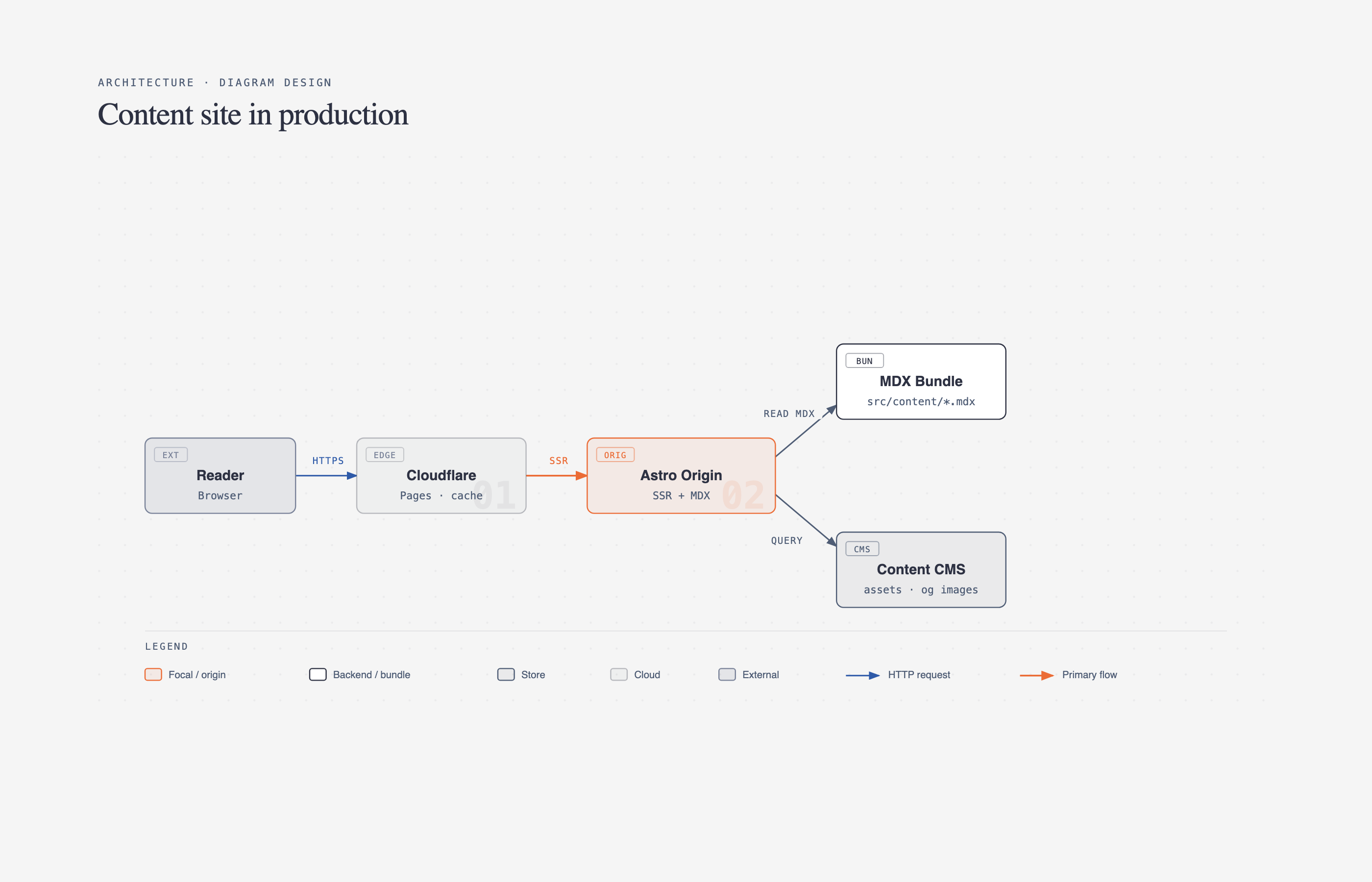 Source: the cathrynlavery/diagram-design GitHub repository
39 diagram types and a real design system
The core is how many diagram types it supports. The current main branch covers 39 visual types — a wide range including architecture, flowcharts, sequence diagrams, state machines, ER diagrams, timelines, and swimlanes, plus specialist ones like Sankey, fishbone, Wardley maps, UML classes, and database schemas.
Ten of those layouts were added in version 2.5.10 to reach today's scope.
Every type is offered in three static variants: minimal light, minimal dark, and full editorial. The output is a single HTML file — no build step, no JavaScript, and no external image dependencies. Just double-click the file and it opens offline, fully rendered.
The consistent look comes from the design system. Here are some of the flagship rules:
| Rule | Detail |
|---|---|
| Color | one accent color per diagram plus 1–2 focus elements that lead the eye |
| Fonts | Instrument Serif for titles, Geist sans for node names, Geist Mono for technical labels |
| Texture | 1px hairlines, no shadows, corner radius capped at 10px |
| Grid | every coordinate, width, and spacing is a multiple of 4 — the key rule that keeps the "AI look" away |
| Icons | 87 monochrome IT/cloud icons (based on Tabler and Simple Icons) |
The README frames it well. "In one diagram, keep just 1–2 accents, and use accent color only where you want the reader to look first." Color density is rated 4 out of 10 — it nudges you to breathe rather than pack things in. And because every icon uses currentColor, the drawings inherit any skin you land on, so nothing breaks after brand onboarding.
60-second brand onboarding — in your site's colors
What sets this skill apart isn't just pretty drawings — it's that they're drawn "matched to your brand." Say something like onboard diagram-design to https://yoursite.com and the agent reads the site, extracts the color palette and font stack, maps them to semantic roles such as paper, ink, muted, accent, and link, and applies them to a style guide once you approve.
The paper (white canvas) becomes your site's background color; the CTA color becomes the accent.
Onboarding automatically runs a WCAG AA contrast check. It verifies how readable ink is on paper at a few pixel sizes, and proposes corrected values when a criterion fails. The output also ships with a "fidelity receipt" telling you which colors, fonts, and sources were used.
Once saved, a brand becomes a reusable profile across a client's many touchpoints. Drop a .diagram-design marker in a project to pin a profile, and each workspace can keep its own brand without touching other work areas.
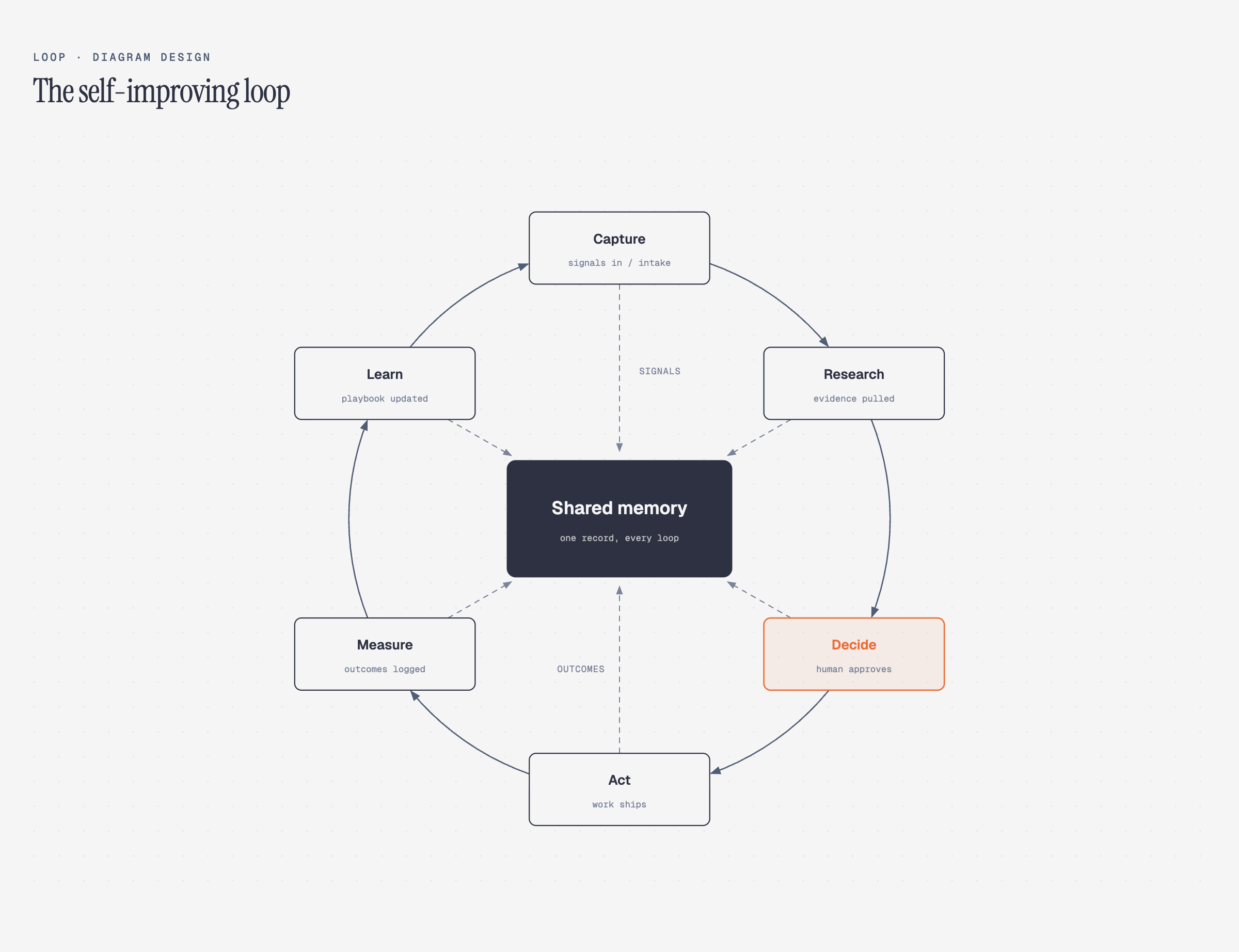 Source: the cathrynlavery/diagram-design GitHub repository
Editorial rewrite of draw.io and Mermaid — 4 dials
Already have diagrams built in draw.io or Mermaid? Hand the file over and say "redraw this with the skill" and it will redraw the same content in this design system. It accepts .drawio, .drawio.xml, .drawio.png, and .drawio.svg files, plus Mermaid's .mmd, .mermaid, and fenced code blocks in Markdown. Because it only parses text, there's no rendering, no browser, and no network calls involved.
The core of the transform is not "copy verbatim" but "adapt to the purpose." The same source comes out four different ways:
| Dial | Options | What changes |
|---|---|---|
| Format | html · svg · png · html+png | whether it's an SVG for Figma or a PNG for slides |
| Size | doc-inline · slide-16x9 · social-og, etc. | viewbox and node-name size (16px for slides, 12px for docs) |
| Detail | faithful (≤24 nodes) · balanced (≤12) · simplified (≤7) | how much stays from the source, trimmed in pass order: decoration → duplication → low-clustering → infra |
| Audience | engineer · mixed · executive | wording only ("Auth / JWT · RS256 :8443" → "Sign in") |
On each transform it shows a fidelity ledger of what got merged and what was dropped — records like "12 source nodes redrawn to 8; the 'is the token valid?' decision was folded into an edge label." You can see what survived and what disappeared without ever reading the source.
If you like the final result, /export-diagram lets you pull it out as SVG or PNG.
Semantic patterns and opt-in motion
You don't need an obvious flow like a flowchart for it to apply. The skill separates what you want to draw (the action) from which shape (the layout). You first choose one of 8 semantic patterns — fan-in queue merging, iterative stages, policy tracking, trust boundaries, and so on — then attach a matching visual type behind it.
This is how it covers many situations without unboundedly multiplying types. Motion is opt-in too, with four modes: none, reveal, step, and loop. Whatever the mode, the first frame is always a complete, static screen.
For accessibility, under prefers-reduced-motion it shows only the static frame and hides playback controls. The default is none, i.e. plain static HTML with no script in normal conditions. On screen readers, the diagram title and description are delivered via role="img" and aria-labelledby.
Where it fits — supported clients and limits
Wide install coverage is also a feature. It supports Claude Code, Codex, Factory Droid, Pi, Kiro, OpenCode, and even Claude Cowork (organization marketplace). Each installs through its own plugin-marketplace path, but the structure is the same.
# Claude Code
/plugin marketplace add cathrynlavery/diagram-design
/plugin install diagram-design@diagram-design

# Codex
codex plugin marketplace add cathrynlavery/diagram-design
codex plugin add diagram-design@diagram-design
A few caveats. Third-party marketplace auto-update is toggled on by default, so after installing you need to enable updates in the marketplace to follow the latest version. If you previously installed a separate copy via npx skills add, that copy won't follow the new marketplace path, so you'll need to remove it and reinstall.
On first use there's a gate that asks whether to run brand onboarding, which can stall an automated pipeline. And because reducing detail caps the node count (simplified caps at 7), genuinely complex systems need a human in the loop. Lightweight pictures — Unicode diagrams for Twitter, a single-line box — aren't this skill's target. The repo's philosophy: "don't draw a diagram that has nothing to teach beyond a well-written paragraph."
Reference links
Related posts
 Open Source & Dev Tools
Camofox: Stealth Browser for AI Agents
Camofox is a stealth browser for AI agents: the Camoufox engine wrapped with a Node.js REST API and a drop-in open-source alternative to Playwright and Puppeteer that beats Cloudflare bot detection.
Microsoft's open-source markitdown: turn files into Markdown
Microsoft's open-source markitdown converts PDFs, Office files, images, audio, and YouTube URLs into Markdown for LLM pipelines. CLI and Python API are simple, and it recently trended on GitHub.
 Open Source & Dev Tools
Open Source HyperFrames: Render MP4 Video from HTML
HeyGen's open-source HyperFrames deterministically renders HTML/CSS/seekable animations to MP4 video. No build step, and 20 AI-agent stacks let agents create videos directly.
Curated, fact-checked, and edited by a single operator before publishing.